Apache Lucene: 7 Concepts to Get You Started
Seven core concepts that will take you from zero to writing your first Lucene search application — explained clearly with code.

Introduction
Apache Lucene is a popular information retrieval library written in Java that powers search servers like Elasticsearch and Apache Solr. Created in 1999 by Doug Cutting (who also created Apache Hadoop), it lets you build search applications with features like term matching, phrase matching, fuzzy search, and proximity search.
Here are 7 concepts that will get you comfortable with Apache Lucene.
1. Inverted Index — Why Lucene is So Fast
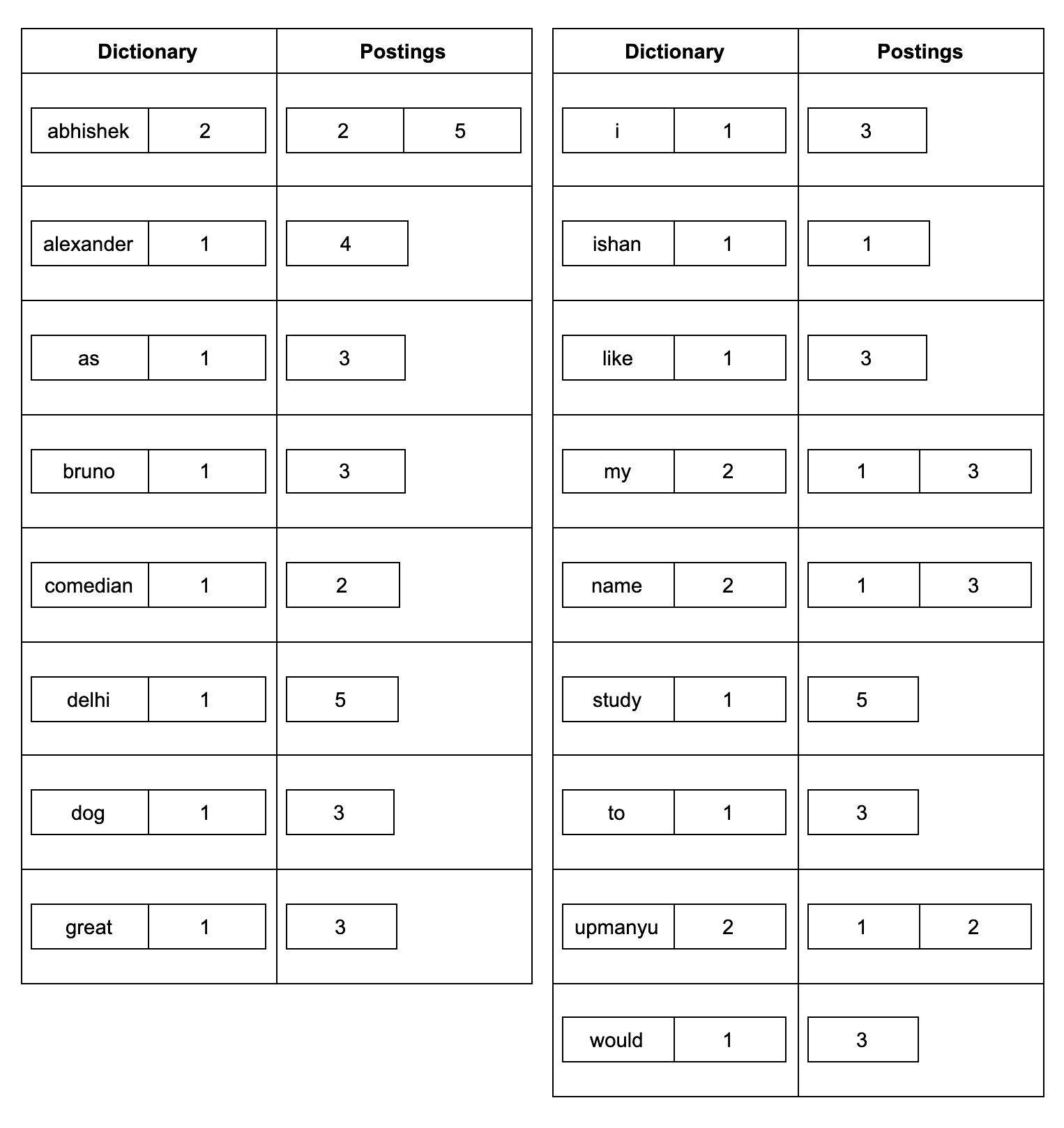
Lucene enables super-fast text search using an inverted index. Instead of scanning all documents sequentially, Lucene pre-creates this index — think of it like the glossary at the end of a book, which maps words to page numbers.
The inverted index has two components:
- Dictionary — all terms in the index with their frequency
- Postings — the list of documents containing each term
For example, indexing these five documents:
Document1: My name is Ishan Upamanyu
Document2: Abhishek Upmanyu is a great comedian
Document3: I would like to name my dog as Bruno
Document4: Alexander the great.
Document5: Abhishek is studying in Delhi.
Results in an inverted index where "great" points to [Document2, Document4], "Abhishek" points to [Document2, Document5], and so on.
2. Fields and Documents — The Building Blocks
Fields
A field is the most basic unit in Lucene — think of it as a column. A field has three parts: a name (identifier), a type (subclass of IndexableFieldType), and data (text, number, or binary).
Notable built-in field types include TextField (full-text search), StringField (exact match), and IntPoint (integer data).
Documents
A document is a collection of fields — like a record in a database table. When you search, Lucene finds the document containing matching data.
Document doc = new Document();
Field pathField = new StringField("path", file.toString(), Field.Store.YES);
doc.add(pathField);
3. Analyzer — Processing Text for the Index
Lucene stores terms in its inverted index, not raw text. An Analyzer converts plain text into those terms — both at index time and at query time. The two must produce matching terms or search won't work correctly.
Analysis is a pipeline of three components:
- CharFilter — pre-tokenization cleanup (strip HTML, normalize characters)
- Tokenizer — splits text into tokens
- TokenFilter — modifies tokens (stemming, lowercasing, stop word removal, synonyms)
Commonly used analyzers:
- StandardAnalyzer — splits on word boundaries, lowercases, removes stop words. Best default choice for English.
- WhitespaceAnalyzer — splits only on whitespace, no case change
- StopAnalyzer — splits on non-letters, lowercases, removes stop words
4. IndexWriter — Writing to the Index
IndexWriter is the main class for creating and updating a Lucene index. It needs a Directory (where to store the index) and an IndexWriterConfig (which analyzer to use).
Analyzer analyzer = new StandardAnalyzer();
Path indexPath = Files.createTempDirectory("tempIndex");
Directory directory = FSDirectory.open(indexPath);
IndexWriterConfig config = new IndexWriterConfig(analyzer);
IndexWriter iwriter = new IndexWriter(directory, config);

Document doc = new Document();
doc.add(new Field("description", "This is the text to be indexed.", TextField.TYPE_STORED));
iwriter.addDocument(doc);
iwriter.close();
5. QueryParser — Making Lucene Understand Your Query
QueryParser converts a text query string into a Query object. You specify a default field and an analyzer. Lucene supports field-specific queries with the format fieldName:queryTerm.
QueryParser parser = new QueryParser("description", analyzer);
Query query = parser.parse("text");
// Or search a specific field:
Query query2 = parser.parse("description:indexed");
6. IndexSearcher — Running Queries
IndexSearcher runs the query against the Lucene index and returns a TopDocs object containing an array of ScoreDoc results.
DirectoryReader ireader = DirectoryReader.open(directory);
IndexSearcher isearcher = new IndexSearcher(ireader);
ScoreDoc[] hits = isearcher.search(query, 10).scoreDocs;
Putting it All Together
Here's a complete example that indexes a document and then searches it:
Analyzer analyzer = new StandardAnalyzer();
Path indexPath = Files.createTempDirectory("tempIndex");
Directory directory = FSDirectory.open(indexPath);
IndexWriterConfig config = new IndexWriterConfig(analyzer);
IndexWriter iwriter = new IndexWriter(directory, config);

Document doc = new Document();
doc.add(new Field("description", "This is the text to be indexed.", TextField.TYPE_STORED));
iwriter.addDocument(doc);
iwriter.close();

// Search
QueryParser parser = new QueryParser("description", analyzer);
Query query = parser.parse("text");

DirectoryReader ireader = DirectoryReader.open(directory);
IndexSearcher isearcher = new IndexSearcher(ireader);
ScoreDoc[] hits = isearcher.search(query, 10).scoreDocs;

for (ScoreDoc hit : hits) {
  Document hitDoc = isearcher.doc(hit.doc);
  System.out.println(hitDoc.get("description"));
}
ireader.close();
directory.close();
You now have everything you need to start building with Apache Lucene. Get your hands dirty and write some code.